ArmorScreen User Manual
Brought to you by Grit and Beskar
Bring your armor to life.
Last updated: 6/02/2025
What is ArmorScreen?
ArmorScreen is a wearable, animated GIF display built for Mandalorian gauntlets, Star Wars-inspired cosplay, or anyone looking to level up their costume with a bit of glowing flair.
It features a crisp 1.44″ full-color 128×128 TFT screen, built-in Wi-Fi Access Point, and support for animated and static GIFs. Whether you’re displaying clan symbols, bounty pings, diagnostics, or ambient loops — this device keeps your visuals sharp and swappable without needing SD cards, reprogramming, or external apps.
Features
- 1.44” 128×128 resolution full-color TFT display (65K colors)
- Wi-Fi Access Point (2.4GHz) – no internet required
- Web-based control panel (upload, select, delete GIFs) at http://192.168.4.1
- Supports animated and static GIF files only
- Auto-plays last selected GIF on boot
- Displays custom Grit and Beskar splash screen at startup
- Default Wi-Fi password: password
- User-changeable Wi-Fi password via settings
- Micro JST (Picoblade) connector for 3.7V LiPo batteries for power
- Averages 6-8 Hr Runtime off 1100mAh 3.7v Lipo battery
- USB-C port for powering via cable (⚠️ No built-in battery charging circuit)
- Compact dimensions: PCB Size 29.7mm × 43.36mm
Powering ArmorScreen
- Option 1: USB-C (5V) from a power bank or wall adapter
- Option 2: 3.7V LiPo battery via Micro JST (aka Picoblade) plug
⚠️ Important: Do NOT connect a USB-C cable and a battery at the same time. This will damage the device.
Recommended battery: 3.7V 1100mAh LiPo
(You can use any capacity—higher mAh = longer run time)
Connecting to Wi-Fi & Uploading GIFs
- Power on the device via USB or LiPo battery.
- Wait for the Grit and Beskar splash screen (displays for 5 seconds).
- On your phone or computer, look for a Wi-Fi network named:
ArmorScreen_XXXX(XXXX is a unique identifier for your device) - Connect to it using the default password:
password - Open a browser and go to:
http://192.168.4.1
(This is the ONLY valid address for the control panel.)
From the web interface, you can:
- Upload new GIFs (must be 128×128 resolution)
- Select which image to display
- Delete unwanted files
- Change the Wi-Fi password
- View available storage (shown at the bottom of the page)
GIF Requirements
- File format: GIF only
- Resolution: 128×128 pixels
- Max colors: 256-color GIFs preferred
- File size: Keep small for better performance
- Optimizing Tool: Use EZGIF.com for resizing and compressing
⚠️ Uploading too many or oversized files may cause performance issues or crashes. Respect the storage limit shown in the interface – thar be dragons!
Behavior on Boot
- First 5 seconds: Displays the default splash screen
- After 5 seconds: Displays your last selected image
- If no image was selected, it will remain on the splash screen
What’s Included
- 1x Fully assembled ArmorScreen device
- Preloaded with default animation
- ⚠️ Battery not included
- Ships tested and ready to install
Technical Specifications
| Spec | Value |
|---|---|
| Display Size | 1.44” TFT (65K color) |
| Resolution | 128×128 pixels |
| Active Area | 26.2mm × 27.2mm |
| Module Size | 29.7mm × 43.36mm |
| Power Input | 3.3V–5V |
| Power Draw | 0.130-0.150 Amps (0.65-0.75 Watts) |
| Operating Temp | -20°C to 60°C |
| Storage Temp | -30°C to 70°C |
| Power Options | USB-C or 3.7V LiPo Battery (not included) |
| Charging Circuit | ❌ Not included |
| Web Control Address | http://192.168.4.1 |
Recommended Battery
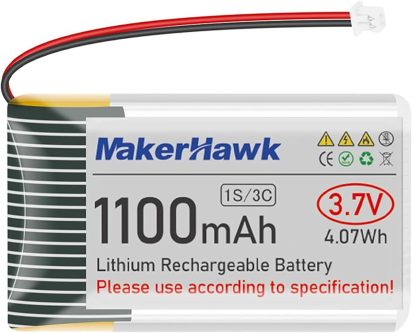
We recommend batteries like the 3.7v 1100mAh MakerHawk or Meshnology Lithium batteries – with Micro JST (PicoBlade)
1PCS 3.7v 1100mAh Lithium Rechargeable Battery+Charger
2PCS 3.7v 1100mAh Lithium Rechargeable Batteries+Charger
2PCS 3.7v 2200mAh Lithium Rechargeable Batteries+Charger
PLEASE OBSERVER POLARITY – RED TO RED, BLACK TO BLACK
You should get an average of 6-8 Hrs of life out of your Armor Screen with an 1100mAh battery.
Troubleshooting & Support
- Image not displaying? Make sure it’s a GIF, 128×128 pixels, and under the size limit.
- Wi-Fi not showing? Reboot the device and check again for
ArmorScreen_XXXX. Sometimes toggling your WiFi off/on can get it to appear faster. - Distorted image? Use EZGIF.com to re-optimize it.
- After I changed the rotation the page does not refresh – This is normal activity, the device saved the settings and restarted and needs to reboot. Refresh the webpage ad you should be OK.
- I changed the WiFi password now I cannot connect – Make sure you see the device in your available WiFi list, reselect it and try again.
- I forgot my WiFi password – If you forgot your WiFi password please reach out to us for support.
- I accidentally loaded a GIF that was too big or too many files and went over the memory limit and the device wont boot – Please contact us for support.
- I accidentally plugged the USB cable and a battery in at the same time – Please contact us for support.
Need help?
Reach out to us at support[at]gritandbeskar.com or visit our Support and Frequently asked questions pages. We know it sucks to need support, but like any good clan, we’ve got your back.
ArmorScreen is a handmade cosplay device, crafted with love and precision by the team at Grit and Beskar. Each unit is tested, tuned, and ready for mission deployment. Whether you’re bounty hunting or just walking the con floor — but should the need for support arise visit our support page or email us at support [at] gritandbeskar.com.
This is the way.